


The Search Analytics API can now tell you more about who finds your business on Google and how they get there. On 16 November 2026, Google added branded query classification, web multimodal reporting and filters for multiple countries or devices. For South African teams, that makes it easier to build a weekly report that explains what moved and where to look next.
Google brought three existing Search Console reporting capabilities to its API. You can use the interface for a one-off review, then automate the same checks once you know which numbers your team will act on. Read Google’s 16 November announcement.
Watch the walkthrough. See how to build and check a weekly Search Console report in five steps.
Watch the explainer on YouTube or watch the full weekly reporting playlist.
What does the Search Analytics API measure?
The Search Analytics API retrieves Google Search Console performance data for a verified property. It can report clicks and impressions by page, country and device, subject to the selected search type and filters. Its November 2026 update adds branded classification for eligible properties, web multimodal reporting and grouped market or device filters.
1. Start with a South African baseline
Use the same property, search type and date windows each week. Start with South Africa, then break out mobile and desktop. Compare two complete seven-day periods with the same weekdays, and use a longer comparison when a handful of clicks can distort the result.
Record the property, search type, date range and filters beside each number. If you’re comparing South Africa, Namibia and Botswana, keep a row for each market before rolling them into a regional total. A regional average can conceal a decline in the country that brings you most of your enquiries.
2. Separate branded demand from discovery
A search for “UltiMedia” and a search for “WordPress maintenance Cape Town” tell you different things about how a visitor found you. Track branded and non-branded clicks separately where Google provides the classification. Review the landing pages behind the movement before deciding what to update.
If the Search Analytics API returns no classification rows, check property eligibility and request filters. Report the split as unavailable until you know why. A home-grown brand filter can serve as an approximation if you label it and account for misspellings and product names. If your Search Analytics API numbers differ from the interface, check the aggregation setting too. See how Google defines branded queries.
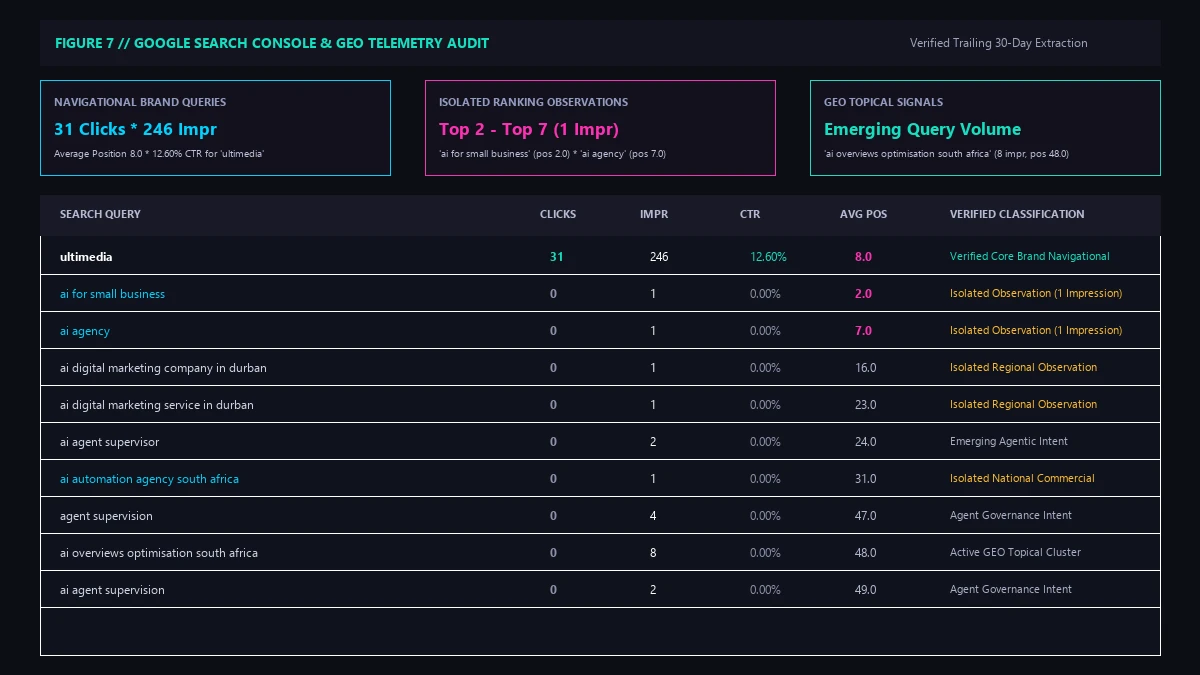
In this UltiMedia snapshot, “ai for small business” averaged position 2 on one impression and received zero clicks. One impression is too little to establish a ranking trend. The query “ai overviews optimisation south africa” recorded eight impressions and zero clicks. That row shows search interest in the topic. To measure visibility in Google’s AI features, use the Generative AI performance report.
3. Give visual search its own line
Google’s web multimodal report covers Lens, Circle to Search on Android and image uploads to Google Search. For a retailer or design studio, start with the product or portfolio pages where images help a customer decide. Compare those pages week over week and investigate the biggest changes.
Keep this line distinct from the dedicated Generative AI performance report. Google’s September announcement describes multimodal filtering in both the Search results and generative AI reports. In October, Google clarified that settings such as snippet controls and the Search generative AI control govern what you share with Search. Treat any visibility setting changes as context for interpreting trends. See Google’s multimodal reporting announcement and its October documentation updates.
4. Compare landing pages with enquiries
Imagine a Cape Town lighting retailer sees weekly non-branded mobile clicks rise from 80 to 100 for a product category. The same landing-page group records four qualified enquiries in both weeks. The clicks are up 25%, while the enquiry count is flat. Those figures are illustrative.
First check whether the extra visits reached the intended pages. Then test the mobile quote form and review how the team records WhatsApp enquiries. A flat count could reflect tracking gaps, a change in visitor intent or ordinary week-to-week variation. The Search Analytics API provides the search side of that investigation. Your analytics and CRM provide separate evidence about outcomes.
5. Automate the checks after one manual run
Compare your first Search Analytics API pull with the equivalent Search Console report. Log the property, dates, country, device and search type with every export. Distinguish empty data from a failed request, and remember that the API can return top rows without returning every row. Check Google’s API reference.
Once the totals reconcile at comparable settings, schedule the export and store each week’s results. Add dashboard notes when you change a filter, rebuild a landing page or switch tracking providers. Keep your weekly Search Analytics API comparisons reproducible. Assign one person to check missing data and another to act on meaningful changes if your team is large enough. Start with a sheet if it has everything the reviewer needs.
Questions about weekly search reporting
Can the Search Analytics API show how often I appear in AI Overviews?
Use Search Console’s dedicated Generative AI performance report for Google’s AI Overviews and AI Mode visibility data. Keep its metrics and date windows explicit in your dashboard, because the scope can overlap with Web performance totals. Check the official definitions before combining any figures. Read the Generative AI performance report documentation.
Should a small business automate reporting immediately?
Start with a manual baseline if you’re still deciding which metrics matter. Set a fixed weekly date range, review the same landing pages and record one decision from each review. Connect the Search Analytics API once the report is repeatable and a person owns the follow-up.
For cross-platform research, see our AI visibility audit. If you’re tying results to paid campaigns and CRM data, use our AI marketing operating system guide.
Want a weekly search report that tells your team what to check next? Talk to UltiMedia about your search reporting setup.